Modoo File Converter

4



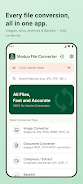


Modoo File Converter is a compact, all-in-one utility that converts and compresses files entirely on your Android device without uploading anything to external servers. It supports image, document and archive conversions plus Base64 encoding so you can turn HEIC photos into JPGs, merge images into PDFs, extract ZIP and 7z archives, or convert Word and Excel files — all offline and stored locally in the Downloads/ModooFileConverter folder for easy access. If you value privacy and local processing, Modoo File Converter is built to handle common conversion tasks quickly on-device.
⭐ Modoo File Converter performs every conversion on-device so no files are uploaded and no internet connection is required.
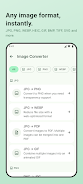
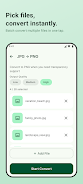
⭐ Broad image support including JPG, PNG, WEBP, HEIC (requires Android 10+), BMP, GIF, TIFF, SVG and the ability to convert images to PDF and merge multiple images into one PDF.
⭐ Document conversions such as PDF↔images/TXT, DOCX→PDF/TXT, XLSX→CSV/TXT, PPTX→PDF/JPG/PNG, CSV↔XLSX, Markdown↔PDF/HTML and HTML→PDF/TXT.
⭐ Archive tools to compress and extract ZIP, 7Z, TAR, TAR.GZ and GZIP with batch compression and high-ratio 7Z support.
⭐ Base64 encoder/decoder with instant, real-time conversion as you type for quick text encoding and decoding.
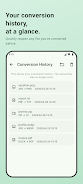
⭐ Batch processing, conversion history for quick file access, adjustable output quality and dark mode with support for Korean and English interfaces.
✅ Keeps your files private by processing everything locally on the device and never sending data to external servers.
✅ Wide format coverage across images, documents, archives and Base64 makes it a single tool for many conversion needs.
✅ Useful features like image-to-PDF merging, HEIC support for iPhone photos (Android 10+), and selectable output quality for smaller or higher-quality files.
✅ Convenience features including batch conversion, conversion history, dark mode and bilingual support (Korean and English) improve everyday usability.
✅ Modoo File Converter saves converted files to the Downloads/ModooFileConverter folder and offers a one-time purchase to remove ads for an uninterrupted experience.
❎ HEIC conversion requires Android 10 or higher, so older devices cannot convert iPhone HEIC photos directly.
❎ Large or complex conversions run locally and can be slower or more resource-intensive than cloud-based services, depending on device hardware.
❎ The free app includes ads; removing them requires a one-time in-app purchase.






















