SonicOS

4.3



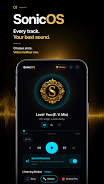
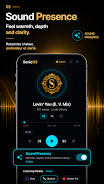
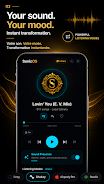
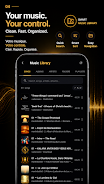
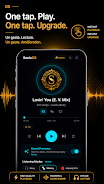
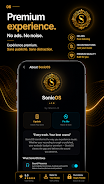




SonicOS is an Android audio player and on-device processing tool that enhances bass, warmth and perceived loudness so local music, podcasts and audiobooks sound better without sending your files to the cloud. SonicOS transforms ordinary earbuds and budget headphones into a fuller listening experience using a one-tap "sound presence" boost, hand-tuned equalizer presets and straightforward playback controls. This editor overview focuses on how the app works, what to expect from the user interface, and which listening scenarios benefit most from its offline, private processing.
The central feature in SonicOS is the Sound Presence toggle: a single control that raises low-end weight, increases perceived detail and adds a touch of harmonic warmth to tracks with minimal user setup. The app includes an 8-band equalizer implemented as a set of hand-tuned presets such as Flat, Bass Head, Airpody Pro, Classical and Jazz; these presets are crafted to match common listening tastes so you can switch moods quickly. Playback speed control ranges from 0.75× to 2×, which is useful for faster podcast consumption or slowing down spoken-word material for study, while a sleep timer with selectable intervals and a gentle 30-second fade-out helps when you want music to turn off automatically.
SonicOS operates entirely on local files: it reads songs, albums, artists, folders and playlists stored on your device and presents them through a polished player UI. Visual touches include living artwork that updates as tracks change, a reactive ring and a spectrum visualizer tied to the audio output, plus blurred backgrounds and subtle animations that make navigation feel modern without distracting from listening. All audio processing happens on-device, so playback and audio enhancement remain private and available offline with no subscriptions required.
The control model is intentionally simple to keep everyday use fast and predictable. SonicOS groups the most-used controls—play/pause, skip, Sound Presence and preset selection—within reach on the main player screen so you can adjust sound without diving into menus. The equalizer presets are presented with readable names and short descriptions so you can understand their effect before applying them. Playback speed and the sleep timer are accessible from dedicated controls on the player, and the app preserves your last-used settings so you don’t have to reconfigure them each session. Folder-based navigation and playlist support let you progress through personal collections in a way that mirrors how files are organized on your device.
Rather than offering a complex, multi-band editor by default, SonicOS emphasizes quick, high-quality presets that make it easy to experiment and find a preferred sound signature. This approach encourages replay value because switching presets or toggling Sound Presence changes the character of familiar tracks and makes revisiting your library feel fresh. Accessibility-minded features include clear labels, a clean layout that avoids small tap targets, and adjustable playback speed which aids comprehension for language learners or listeners with hearing differences. The UI’s visual cues—artwork, progress ring and analyzer—also help visually confirm playback state at a glance.
SonicOS is designed for users who prefer to keep their audio local: it does not rely on cloud syncing or remote processing. All enhancements and equalization are applied on-device, which preserves privacy and eliminates dependency on an internet connection. This makes the app well suited for airplane use, commuting in low-signal areas, or anyone who intentionally manages their media library without streaming accounts. Because the player focuses on files already on your phone, there are no in-app subscriptions tied to core functionality.
Advantages include an immediate and noticeable sonic improvement on inexpensive earphones and additional clarity on higher-end headphones with a single tap, a compact feature set that keeps daily controls accessible, and the convenience of offline, private processing. The preset-driven equalizer is valuable for users who prefer quick, reliable results without an expert-level setup. Limitations are explicit: SonicOS does not provide cloud integration with streaming services, and users seeking a fully customizable multi-band equalizer may find the hand-tuned preset approach limiting. The app is intentionally optimized for private, local playback rather than for library synchronization or online features.